
WinZip have just released a free iOS app to let you easily unzip files (Zip or RAR) on iPad or iPhone. Unzipping files has long been an issue on devices like the iPad – some people use the pricy GoodReader app ($4.99 – supports zip and rar files) or free apps like iUnarchive Lite but both have their own limitations.
You may have forgotten them but the eponymous WinZip are still going! They have been involved in compression and extraction products for over 20 years so a free iOS app straight from the horse’s mouth is to be welcomed.
WinZip iOS App – It has averages ratings of 3.5 stars but is free and designed for iPad, iPhone, iPod Touch. The app requires iOS 4.2 (or higher) and is a small 1.8MB download.
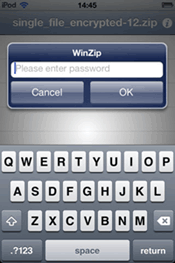
Features – WinZip is a compressed file management app for iPhone, iPad and iPod Touch and works with Zip and RAR files (no 7zip support). You can use it to open Zip/RAR files and attachments from email, browse and view Zip/RAR files (including multi-file attachments) and open encrypted Zip files (AES encryption not supported).
You can also copy the contents of Zip files to the clipboard and view Zip file attachments from webmail (Yahoo, Gmail, Hotmail, etc). Pretty much all types of zipped and document formats are supported except .7z – you can preview the following: .txt, .doc, .docx, .xls, .xlsx, .ppt, .pptx, .rtf, .pdf, .key, .numbers, .pages, .htm, .htm, .jsp, .bmp, .jpg, .jpeg, .tif, .tiff, .png, .gif
The user interface is fairly simple and handy for quickly opening and managing compressed Zip files on your iPhone and iPad.
Download – and more info at iTunes store here.
Conclusion
WinZip is as good at handling Zip and RAR files as you would expect from a market leader. It lacks the ability to open 7zip files but this is perhaps to be expected as it is a competing, and less popular, format – it may be a vain hope but perhaps WinRAR will one day take up the challenge and produce a free app too.


I hope I can open my zip books on my iPad.