Skip to content
TechLogon
  • Home
  • Web Browsers
    • Chrome
    • Firefox
    • IE
  • Software
    • Windows
    • Android
    • iOS
    • Mac
  • Security
    • Viruses
    • General
    • Data
  • Hardware
    • Storage
    • Routers
    • Drivers
    • Printers
    • Networks
    • Other
  • Reviews
  • Tips

Home » RAM

RAM

Suspend Inactive Tabs To Drastically Free Up Memory In Chrome

The Great Suspender is an aptly named Chrome extension which can suspend inactive tabs – saving RAM (memory) and freeing up CPU resources.

Unload Inactive Tabs To Drastically Free Up Memory In Firefox

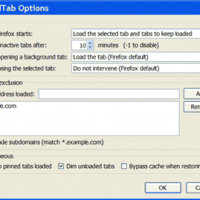
UnloadTab is an extension for Firefox which can unload inactive tabs – saving RAM (memory) and freeing up CPU resources. In my own tests with multiple tabs open, RAM usage is typically reduced by more than 50%.
speccy motherboard

How To Check Which Type Of RAM You Need For Upgrading

Two simple ways to find out which type of RAM you need to buy to upgrade or replace memory.

Review Of Firefox, Chrome And IE Speed And Memory Usage

Testing Firefox RAM usage versus IE and Chrome – the results are surprising.

task2

Will More RAM Memory Make My Computer Faster?

Computers slow down if they don’t have enough memory (RAM). How to check and add more if needed.

FOLLOW US:

How To Stop Scam Phone Calls On A Landline

homeplug idea

Using HomePlug Powerline Adapters To Extend Internet

32 inch tv as monitor

Using A 32 Inch TV As A Computer Monitor

Should You Use Compatible Ink Cartridges or Genuine Ink?

Free Bejeweled Classic on Chrome, Android and iOS

POPULAR POSTS

  • How to Ping Google.com to test your Internet connection

  • Android App To Help You Improve WiFi Speed

  • How To Reload All Tabs In Chrome, Firefox Or IE

  • How To Disable Print Preview In Google Chrome

  • 7 Steps To Fix Flash Player Not Working in Chrome

  • Benefits Of Partitioning A Hard Drive

  • About Us
  • Copyright
  • Disclosure
  • Privacy Policy
  • Terms
  • Accessibility Statement
As an Amazon Associate I earn from qualifying purchases. See our Disclosure page for details.
© 2011 - 2026 TechLogon.com | All Rights Reserved.