
We review which is the best free antivirus – Avast, AVG, Avira or MSE. Updated 4th December 2012 – new test results. Recently I reviewed the best antivirus programs but one question I keep being asked by customers in my computer repair business is which is the best free antivirus? Specifically, people want to know how the top four compare to each other.
Those 4 programs are by far the most well known, racking up hundreds of millions of downloads but what’s the best free antivirus? As they’re all free, price isn’t a factor – the most important differences will be in the level of protection they offer – lots of bells and whistles are pointless in a free antivirus program if it doesn’t provide adequate protection.
I will therefore review the level of protection first and then look at the other features of each program. The latest versions of each program (and links to my initial reviews) are:
Avast Free Antivirus 7
AVG Free Antivirus 2013
Avira Free Antivirus 2013
Microsoft Security Essentials 4.1
The commercial paid version of Avira was included in the tests because independent testing labs don’t test the free version. It is possible to estimate how good the Protection of Free Avira would be – just as when labs test the paid AVG against free AVG there is only a slight difference of about half a point (the paid versions simply have more features and a firewall) because it’s the same AV engine being used in both.
Tip: although not as popular, the latest ZoneAlarm Free Antivirus 10.2 is a surprise package that has leapfrogged above all 4 of its free rivals for protection – and is the only one to include a firewall.
PROTECTION – The independent security institute AV-Test publish regular tests of antivirus software. Their latest tests for Sept/Oct 2012 rated the antivirus programs as follows:
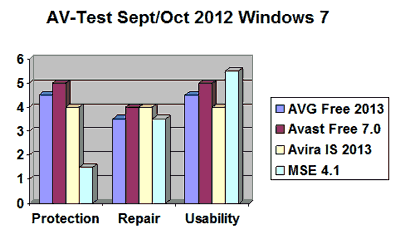
- Avira falls down a little on usability but this may be because it is the paid version so includes a less user-friendly firewall. Repair abilities are close with AVG and MSE falling slightly behind. When it comes to Protection – Avast and AVG score very well and put many paid products to shame. Avira Free is likely to be a little lower than the paid version tested and MSE is a huge way off the pace – the only one of 24 products tested not to achieve certification.
- Protection is always more important than Repair – viruses and malware can do so much damage (e.g. hiding all your documents or disabling your antivirus) before you realize you are infected that it is obviously best not to get infected in the first place. For this reason I rate Avast and AVG as top dogs, followed by Avira, leaving MSE trailing in fourth place.
Because these tests were performed on Windows 7, I wanted to see if the results were different on Windows XP so checked the earlier tests from Jul/Aug 2012 (full results here):

- MSE has particularly good Usability – perhaps a key factor in its huge popularity. Repair abilities are also close but AVG and MSE fall behind. When it comes to Protection – AVG, Avast and Avira score highly (although Avira Free is likely to be a little lower than the paid version tested) but MSE again falls a long way behind.
- There’s not much to choose between the top 3 but MSE is left trailing in fourth place.
False Positives
False positives are detections of legitimate software as malware during a system scan. This can be almost as problematic as not detecting malware – if legitimate files are blocked or quarantined, genuine programs may not install/run correctly.
The combined number of false positives in the tests during September and October reveal that Avira and MSE had 1, Avast had 2 but AVG had 10 – and it had 10 in the tests between July and August too.
This is another shocking result from AVG, suggesting that its high position in Protection may have only been achieved by erring far too much on the side of caution – if you flag up almost every new file as malware you may get good protection at the expense of not being able to run/install genuine programs…
Conclusion – Protection
It is difficult to give an absolute opinion on protection levels – results inevitably differ depending on how the testing is performed and which settings are chosen within each antivirus program.
My own conclusion from the tests above (and many others I have reviewed) is that Avast takes first place with Avira second – both offer solid virus and malware protection.
AVG takes third (due to its high number of false positives) and MSE is some way behind, providing dire levels of Protection compared to the others.
FEATURES
1. Download size
MSE – 8MB (32bit) or 10MB (64bit)
Avast 7 – 89MB
Avira – 97MB
AVG – online web installer 4MB then download the full package – 118MB (32bit) or 130MB (64bit) in total
Download size doesn’t necessarily show how many features a product has or how quickly it will work once installed. However, it can be a useful estimate as to how tightly a product is coded and how many ‘features’ are bundled into it.
MSE is tiny which matches its minimalist look and feature set – an ‘install and forget’ program with few extra features. In some ways that is a good thing but, considering its reduced level of Protection above, perhaps it is also a sign that its lightweight look and feel comes at the expense of security.
Avast and Avira are average sizes and both provide a single download. AVG is bigger than some full paid internet security suites and its use of a web installer means that you have to download the whole 118MB+ for each computer you want to install it on – to avoid this, I have included links to the full installation files in the Download section below.
2. Basic Features
All 4 programs are free for home or personal use.
All 4 programs offer real-time (always on) and on-demand (scan) protection against viruses, spyware, adware and rootkits.
3. Email protection
Avast and AVG scan incoming/outgoing email for malware.
MSE and Avira do not (available in the the paid Avira Premium).
4. Safe Surfing Browser Add-on
The free WOT (Web Of Trust) is my recommended safe surfing add-on (see review) but free antivirus programs increasingly include their own versions:
AVG Free provides ‘LinkScanner’ whilst Avast uses ‘WebRep’ – both do a reasonable job. I don’t think they are as good as WOT but you could use both for maximum protection. MSE does not include a safe surf add-on.
Avira offers ‘WebGuard’ in the form of an opt-in Ask.com toolbar and search engine redirect which it calls Avira SearchFree Toolbar – personally I find this a little misleading as it is easy to install Ask.com by mistake.
5. Sandboxing
Avast provides an ‘AutoSandbox’ feature which automatically puts suspicious executable files into a virtual state if they are a threat.
6. Gaming/Silent Mode
A silent mode offers the ability to stop all notifications and messages from the antivirus program – typically used when you are gaming or in full screen mode to prevent interruptions from updates and pop-up messages.
Avast and AVG include a gaming mode option. MSE and Avira do not (available in the the paid Avira Premium).
7. Boot-time Scan
A boot-time scan (as the computer starts up) may remove infections that cannot be removed whilst Windows is running – especially rootkits which are totally hidden in Windows.
Avast includes an option to set a boot-time scan. MSE and Avira don’t.
AVG doesn’t either but they do offer a free download of their System Rescue Disk here for CD or USB drive – booting from this provides similar functionality for removing infections via a boot-time scan.
Conclusion – Features
Avast is the clear winner with most extra features and AVG is a close runner up. Avira and MSE miss out on minor extras like Gaming mode (not important to all) but also on major features like email protection and boot-time scans which really should be included to compete with the best.
Conclusion – Overall
Updated 4th December 2012 as a result of the new tests.
All the programs offer useful protection and features for free and it’s difficult to choose a winner – especially as results may change over time as products are constantly updated. To make the decision even harder, not all of the features reviewed will be of the same benefit to every user and the overall level of protection offered may depend on the version of Windows used.
You will likely have reached your own conclusion by now. But if you haven’t, I said at the start that people ask me which I think is the best free antivirus program and they want a specific answer – not me sitting on the fence and saying they’re all good in their own way ;-) So, in my personal opinion, I rate them as follows:
1st – Avast 7
2nd= AVG 2013 and Avira Free Antivirus 2013
4th – MSE 4.1
Avast has more (useful) features than AVG and is lighter, faster and has fewer problems with false positives – it offers very good protection and repair abilities too.
Avira protection is good but it misses important features that the others include as standard. More than any of the others, it seems to be a hook into the paid version rather than a genuine attempt at a comprehensive free product. Microsoft Security Essentials was the worst choice of all for security.
However, each program has its own strengths and weaknesses that may make it more suitable for your own specific requirements so I have given the system requirements and download links for all of them below:
Minimum System Requirements
AVAST Free Antivirus 7
Operating System: Windows 8, Windows 7, Vista (any edition except Starter), XP SP2+, Windows 2000 SP4
RAM: minimum 128MB RAM
AVG Free Antivirus 2013
Operating System: Windows 8, Windows 7, Vista, XP SP2+
RAM: minimum 512MB RAM for XP or 1GB RAM for Vista/7
AVIRA Free Antivirus 2013
Operating System: Windows 7, Vista SP1+, XP SP3 (32bit) or SP2+ (64bit)
RAM: minimum 512MB RAM for XP or 1GB RAM for Vista/7
MICROSOFT Security Essentials 4.1
Operating System: Windows 7, Vista SP1+, XP SP3 Note: not compatible with Windows 8 – see here for details
RAM: minimum 256MB RAM for XP or 1GB RAM for Vista/7
Tip: in my experience all the RAM figures above are optimistic and absolute minimum requirements i.e. the antivirus will work but your computer may become very slow. Whether you use free or paid antivirus, my own recommendation is a minimum of 1GB for XP and 2GB+ for Vista/7/8.
Downloads:
AVAST Free Antivirus 7 – website or direct download from Filehippo
AVG Free Antivirus 2013 – website or full installation file at Filehippo here (32bit) or here (64bit)
AVIRA Free Antivirus 2013 – website or direct download
MICROSOFT Security Essentials 4.1 – website or direct download


after playing with all tools to test antivirus programs i found avira is the best
Hmm. Was hopeful that I found a good product in AVAST.. Unfortunately keeps crashing the in-laws laptop. Blue screen of death with monotonous regularity. Not a good way to keep the in-laws onside. I have just uninstalled and no more crashes. Now to try option 2, AVG and regain their faith.
I wonder if there’s something else going on in your inlaw’s computer. Have you scanned for malware or spyware? What about booting in Safe mode? Some virus’ prevent any antivirus from working properly (or even installing properly). I would try running Malwarebytes (free program), then Combofix (also free from bleepingcomputer.com), then IF they install & update properly, run them then re-try installing Avast.
Good luck!
…Bert
Thanks for all the detailed comparison info. I was getting increasing fed up with hefty processes running in the background and after disabling the obvious things like ‘superfetch’ was left with the fact the AVG, which I’ve used for years, was the problem. It caused problems too with mozilla and ‘avg safesearch’. It also threw up false positives, one of which was to do with adobe. I took your recommendations and moved over to avast!, and the change has been remarkable – much increased speeds on browser lauch and a quieter and more efficient computer. The only problem I had was I forgot to uncheck the ‘google chrome’ box and had to uninstall it after avast! installation. This affected the registry keys and I couldn’t use any links in my emails – found a fix from microsoft (eventually) for that though. I’m trialling the avast! paid security option at the moment – who knows’, maybe I’ll move off free anti-virus if it is this good! ,
I think the free version is good enough, but hey, if you want the added protection, that’s your choice. For myself, I only want the anti-virus protection. I use malwarebytes to protect my system for malware, and spybot search & destroy for spyware protection.
Good luck!
Hi, I would like to point out that the free version of Avira no longer installs on XP 32bit SP2, this has been the case for some time now (March 2011 i think) so for many still using XP SP2 32bit Avira does not support it, If you have an old version installed it will not update. I have no idea if this is the case with the paid for version but i would have thought so and i have not used the others in this reveiw *yet* as an alternative.
Thanks for the correction John. I have updated the system requirements and checked that the others are up to date for the latest 2013 versions of the products (Avira paid for versions also require SP3 for XP 32bit)
I’ve used AVG up to version 8, where it became too bloated for me to want to keep using it (that’s why I switched from NAV to AVG in the 1st place), so I’ve tried Avast, and still LOVE it. The boot time scan is one of the best features I want in an AV program, scanning outside of Windows is a no-brainer in my opinion. Although I must say I don’t use the Auto Sandbox feature, in Avast 7, maybe I’m wrong, but I think this will just bloat an already efficient AV program. Someone can correct me on that, as I don’t know for sure. I am finding however that AVAST 7 is getting more and more bloated and seems to be slowing things down in my computer (i.e. startup, boot time, etc…). All in all however I highly recommend Avast free until something leaner & better comes along. I thought maybe that would be Avira, but from what I’ve seen & read here, it’s clearly not an AV that I want to protect my system.
Thanks for the comments Bert. Agree on the boot time scan – all AV should offer this imho as it can remove infections that can’t be (easily) removed whilst Windows is running.
Sadly very few AV do so, even the paid ones. Some offer a separate ‘Rescue’ CD to burn but that adds another level of complexity – too much for many users
In your opinion Roy, do you think it’s worth enabling sandbox? I don’t know why, but I think it’ll just slow things down (when browsing or otherwise). What do you know about that? I’m trying to keep Avast as lean as possible, and I don’t really “do” the social media thing.
On Sandboxing,
According to Avast “Sandboxing” is not a feature included the free product. I’m not sure why Sandboxing would be included in a ‘free’ product discussion if it is not free. Maybe the author didn’t realize this or perhaps this is new as of 8/10/2012.
Hi, thanks for the query – it’s actually Avast that is wrong ;-) Their mistake has been discussed in Avast forums e.g. http://forum.avast.com/index.php?topic=95148.0
My review (note 5) refers to the ‘auto-sandbox’ feature which is definitely still in Avast Free 7 – just reinstalled it to test.
[There is a different ‘browser sandboxing’ feature that completely isolates the browser from the rest of the system – this is only available in the paid version]
None of Avast’s rivals have an auto-sandbox to run risky programs virtually so it seems fair to include it as a key bonus feature of Avast Free
Oh thanks for the info! That is worth mentioning in your article if you decide to edit it, or did i miss that part too? Ive dumped my Comcast Norton for Avast. Thanks for the article.
bit defender is world’s best antivirus but too much heavy like kaspersky….. avast is best because it’s light, and strong detector ,,, Although no more than above two… but to choose reliable and stable you must download AVAST
I run the paid version of AVG on my win 7 pro I have a paid version of comodo on another computer and I also run malwarebytes, sueranti spyware, cc cleaner and search and destroy
I wish they had looked into comodo and kaspersky or ad aware the article seems to be hastly written but does have some good information
Hi Keith, good selection you have there! Some of the programs you mention are retrospective scan only in their free versions (MBAM, SAS, adaware) – very useful if you have been infected but no active protection.
Therefore I couldn’t include them as the review covers free AV products (i.e. active protection) with independent tests available.
Kaspersky is my pick of the paid AV – if you follow the links to the full test results you can see how KIS 2012 compares – it easily beats all 4 free AV but that should be expected. AVG paid does pretty well too