
Firefox 22 is due to be released today with enhanced performance, configuration and many other technical improvements as reviewed below:
Major performance improvements:
- Odinmonkey (asm.js optimizations) is enabled – this is an optimization module for the browser’s JavaScript engine and should result in JavaScript code on websites running much faster.
- Improved WebGL rendering performance (canvas updates made synchronous to remove delays in rendering a webpage).
- Improved memory usage and display time when rendering images.
Windows only – Display Scaling: Firefox now uses Windows (rather than its own) display scaling options to render text larger on high-res displays. Whilst this is supposed to be an improvement, some users may find that it results in text and graphics becoming too large (or even blurring) – especially if you use a large Windows DPI or Zoom in Firefox.
Fortunately it is still possible to change this new behavior by editing the browser’s preferences. The relevant preference in about:config is layout.css.devPixelsPerPx which lets you change the the dimensions of elements.
- Open Firefox and type about:config in the address bar and press Enter. Click the “I’ll be careful I Promise” warning button to reveal a long list of preferences.
- Search for (see tip below) or scroll down to the preference named “layout.css.devPixelsPerPx” – the default Value in FF22 is now -1.0 (use Windows scaling).
- Double click it to open the String Value text box and change it to a new value as required then click OK.
Note: if you want things to look like they did before then change it to 1.0 – this was the default value in FF21 and earlier (this reverts back to using Firefox scaling). However, you could also choose a value between 0.05 and 1.0 (in 0.05 increments) to reduce elements in size (e.g. 0.5 would make elements half the size) or use a value greater than 1.0 if you want to make elements larger (e.g. 2.0 would be twice as large).
- Close the about:config tab – the new value should take effect immediately.
Tip: You can scroll down the list of preferences but the quickest way to find it is to just type part of the preference name (e.g. pdfjs) into the Search box at the top of the config page.
HTML5 audio/video playback rate can now be changed – if using the Firefox HTML5 player you can now change the playback speed. A range of speeds are available: slow motion (0.5x), normal, high speed (1.5x) and ‘ludicrous’ speed (2x). To change the playback rate, right click in the HTML5 video and select ‘Play Speed’ as shown below:

WebRTC is now enabled by default – You can read more about this rather cool feature at Mozilla’s blog here. PeerConnection and DataChannels are now enabled by default – PeerConnection lets the browser set up real-time audio/video calls whilst DataChannels lets browsers share almost any kind of data peer-to-peer, either during or outside a video call e.g. by dragging an item into a chat window.
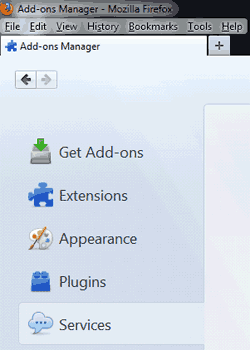
Social services management – implemented in the Firefox Add-ons Manager. Open the Add-ons Manager (via menu button\Add-ons or Tools\Add-ons from the menu bar) to reveal the new ‘Services’ tab as shown below – here you see a list of any social media add-ons you have installed and can choose to disable or remove them.
Mac OS X: Download progress in Dock application icon
Other Changes – these include the ability to word-wrap plain text files displayed within Firefox, Pointer Lock API can now be used outside of fullscreen and a fix for an issue where scrolling using some high-resolution-scroll aware touchpads feels slow.
Security Changes – the Components object is no longer accessible from web content.
Developer Changes – include a new Web Notifications API implemented and a new built-in font inspector.
New Features Present But Still Disabled – These are new features introduced in the last few releases which haven’t yet been enabled. Whilst they work fine for me it is possible they could have outstanding bugs but more adventurous users (or those wishing to get an early view of future features) can choose to enable them – they can easily be disabled again if they cause any issues:
1. Click to Play – this feature (configure all plugins to only load on click) is still not enabled by default. However, you can activate it via a change in about:config – see Activating Click To Play and Add a Button to switch Click To Play on or off.
2. In Content Preferences – this feature (Firefox Options open in a new tab instead of a separate window) is also still not enabled by default. However, you can activate it via a change in about:config
HTML5 Score – The HTML5 test score of FF22 increases by 11 to a total of 410 (in my tests of the Beta version) which keeps it in third place amongst the major browsers tested. For comparison:
Chrome 27 – 463
Opera 12.10 – 419
Firefox 22 – 410
Safari 6 – 378
IE10 – 320
IE9 – 138
Conclusion
FF22 includes several new performance features plus many fixes and changes. As usual, this new version is available as an upgrade for existing users from today over several days (to avoid overloading Mozilla’s servers).
If you check for updates (via Firefox Menu \ Help \ About Firefox \ Check For Updates) and find there are none available yet, try again a day or two later. It should also be available soon for full download at Mozilla here.



Thanks guys, good to be back ;-) Just starting to find more time away from the day job to pick things up again.
yeah, thanks for the post !! (thought you had packed it up – lol)
so all two of your readers appreciate your posts, anyway
Glad to see you back, Roy!